Google just dropped its best image model yet. Here’s an honest look at what actually changes for working creatives.
Every few months, a new AI tool drops and the internet loses its mind. But Nano Banana 2 Pro feels different. This one actually changes the math.
Google just launched Nano Banana 2 — built on Gemini 3.1 Flash Image — and it’s the first AI image tool that genuinely combines professional-grade quality with the kind of speed that fits into a real creative workflow. Not a research demo. Not a waitlist. Available now, inside Gemini, today.
So what does that actually mean if you’re a photographer trying to keep up with client demands? Or a graphic designer who’s been watching these tools skeptically, waiting for the moment they’re actually useful? Let’s break it down honestly.
First, What Even Is Nano Banana 2 Pro?
A quick jargon-free explainer before we get into the implications.
Nano Banana is Google’s AI image generation and editing model, baked directly into Gemini. The original version launched in mid-2024 and went viral almost immediately for its surprisingly capable image editing via simple text prompts. Then came Nano Banana Pro, which traded speed for significantly higher quality — 4K resolution, better reasoning, and studio-grade output.
Nano Banana 2 is the best of both worlds. Google describes it as combining the advanced world knowledge and quality of Nano Banana Pro with the lightning-fast speed of Gemini Flash. You get near-Pro quality results in a fraction of the time, without choosing between speed and output quality. You access it inside Gemini — no new app, no separate subscription.
What This Means for Photographers
The 4K Advantage: Print-Ready From a Prompt
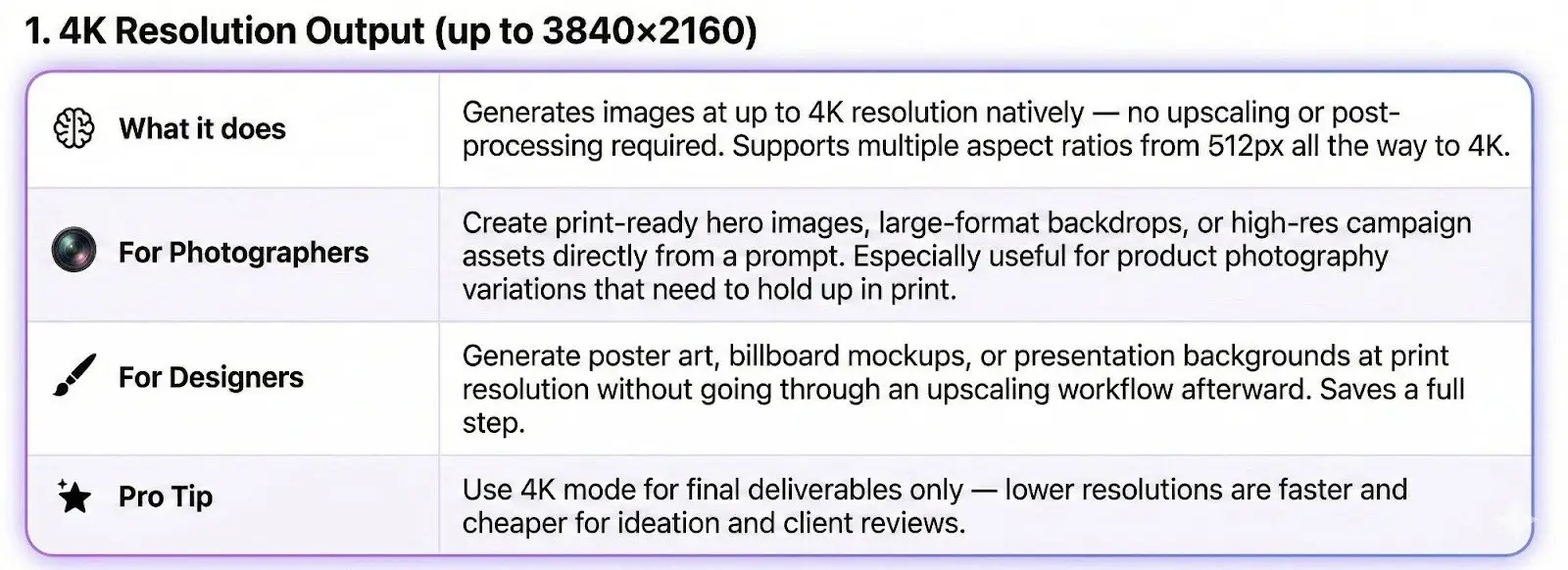
Nano Banana 2 Pro generates images natively at up to 4K (3840×2160) resolution — no post-processing or upscaling required. For photographers, this means print-ready hero images, large-format backdrops, and high-res campaign assets directly from a text prompt, especially useful for product photography variations that need to hold up in print.
The Product Photography Question Gets Complicated
Nano Banana 2 can take a product image and generate studio-quality variations — clean backgrounds, commercial lighting, precise shadows, different scene contexts (kitchen, outdoor, lifestyle) — all from a text prompt. What used to require a half-day studio shoot, a stylist, and a post-production pipeline can now be iterated in minutes.
Does that replace the photographer? Not entirely — and not yet. But it absolutely changes the conversation with clients about budget, turnaround, and what they’re paying for. The photographers who adapt fastest will position themselves as creative directors of this process, not just operators of camera equipment.
Prompt-Driven Editing Is Now a Real Workflow
You can now describe an edit in plain language and have it executed intelligently. “Shift this to golden hour light.” “Remove the distraction in the background.” “Make this feel more editorial, less commercial.” The AI understands context, not just pixels. That’s a meaningful shift from the slider-based paradigm photographers have worked in for two decades.
This doesn’t mean the edit is always perfect on the first try. But it does mean iteration is faster, experimentation is cheaper, and the barrier between an idea and its execution has dropped dramatically.
What This Means for Graphic Designers
Typography in Images — Finally Solved
Ask any graphic designer about AI image tools and you’ll hear the same complaint: the text is always garbage. Gibberish letters. Distorted fonts. Words that look vaguely like English but aren’t. It’s been one of the defining limitations of the entire category.
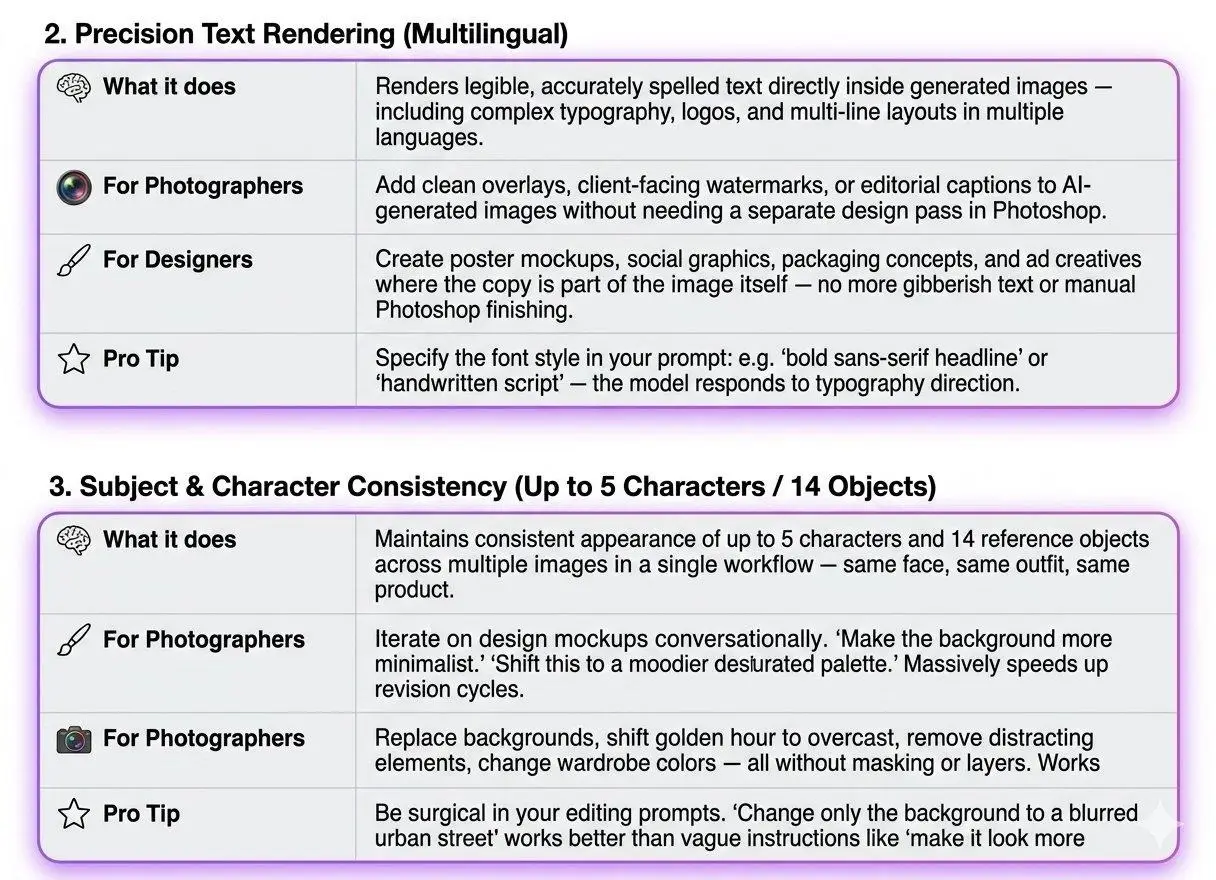
Nano Banana 2 Pro has largely solved this. The model renders clean, legible typography directly inside images — in multiple languages, in various font styles, integrated naturally into the composition. An entire category of work that required Photoshop as a finishing step can now be done end-to-end with a prompt.
Character Consistency Changes Campaign Work
One of AI’s most persistent weaknesses has been keeping a subject consistent across multiple generated images. Nano Banana 2 now maintains the appearance of up to 5 characters and 14 reference objects in a single workflow. For photographers doing campaign content, and designers building storyboards, this is the capability that makes the tool genuinely viable at a professional level.
Branding and Concepting at a New Speed
The mood board phase of a branding project used to take days. With Nano Banana 2, that process compresses dramatically. You can generate multiple distinct visual directions for a brand in the time it used to take to find good reference imagery. Multi-image fusion — accepting up to 14 reference images — means designers can feed in brand guidelines (logo, colors, textures) and get on-brand assets out.
How Does It Stack Up Against the Competition?
Nano Banana 2 Pro doesn’t exist in a vacuum. Here’s how it compares to the tools most photographers and designers are already using — Midjourney V7, Adobe Firefly, and GPT Image 1.5 — across every feature that actually matters in a professional workflow.
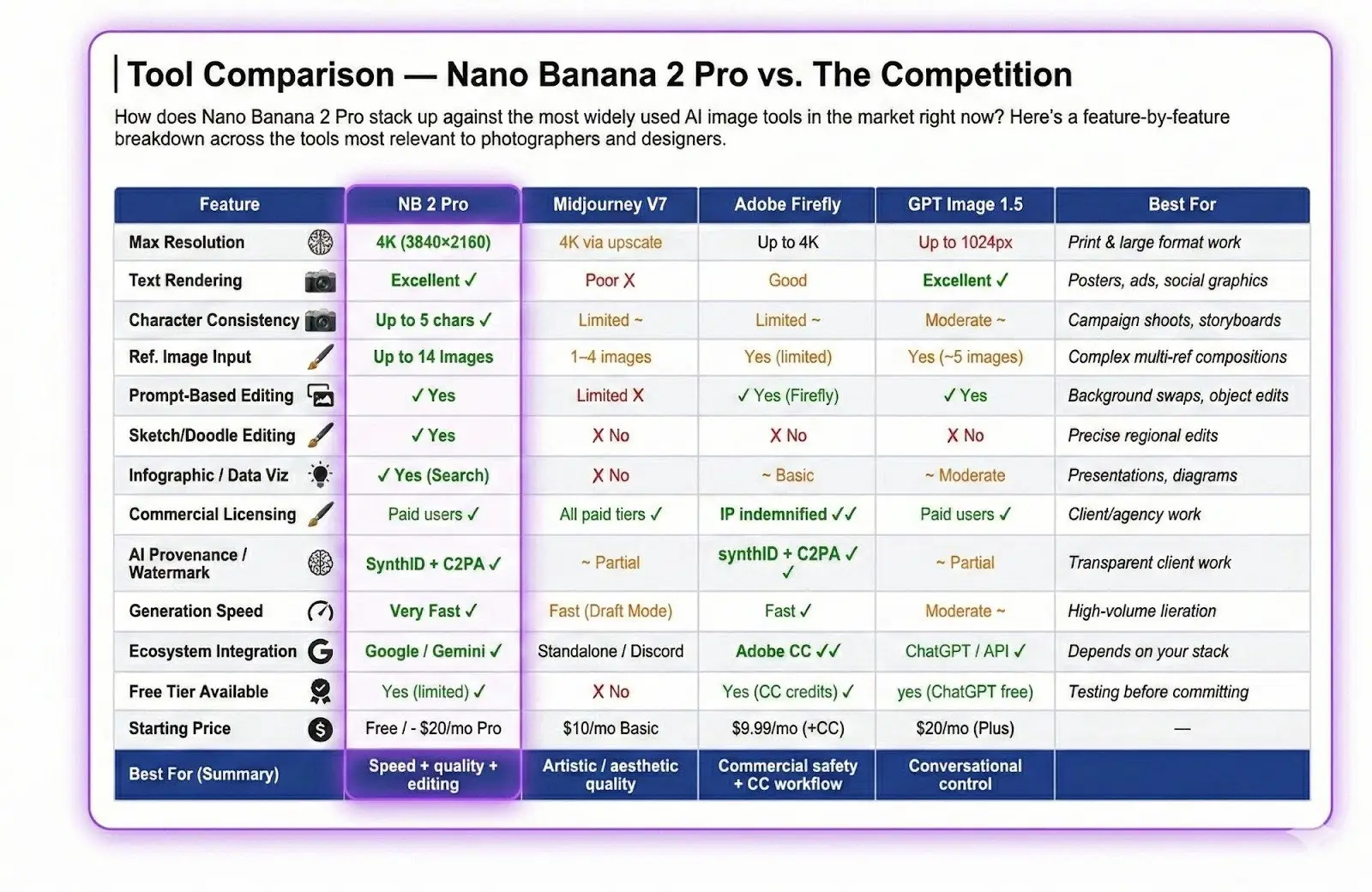
The short version: Nano Banana 2 Pro wins on speed + editing + character consistency. Midjourney V7 still leads for pure artistic quality. Adobe Firefly is the safest choice for commercial client work. GPT Image 1.5 is strongest for conversational control and text.
The Honest Conversation
If a significant portion of execution work becomes automatable, the premium moves to the things that can’t be automated: taste, judgment, client relationships, creative direction, and the ability to know which of the AI’s outputs is actually good and which one just looks good at first glance.
As these tools get better, the gap between someone with strong creative instincts using AI and someone without those instincts will actually widen, not narrow. The tool amplifies judgment — it doesn’t replace it.
The photographers and designers who treat this as a threat will find themselves fighting a losing battle. The ones who treat it as a new instrument to learn will find that their ceiling just got higher.
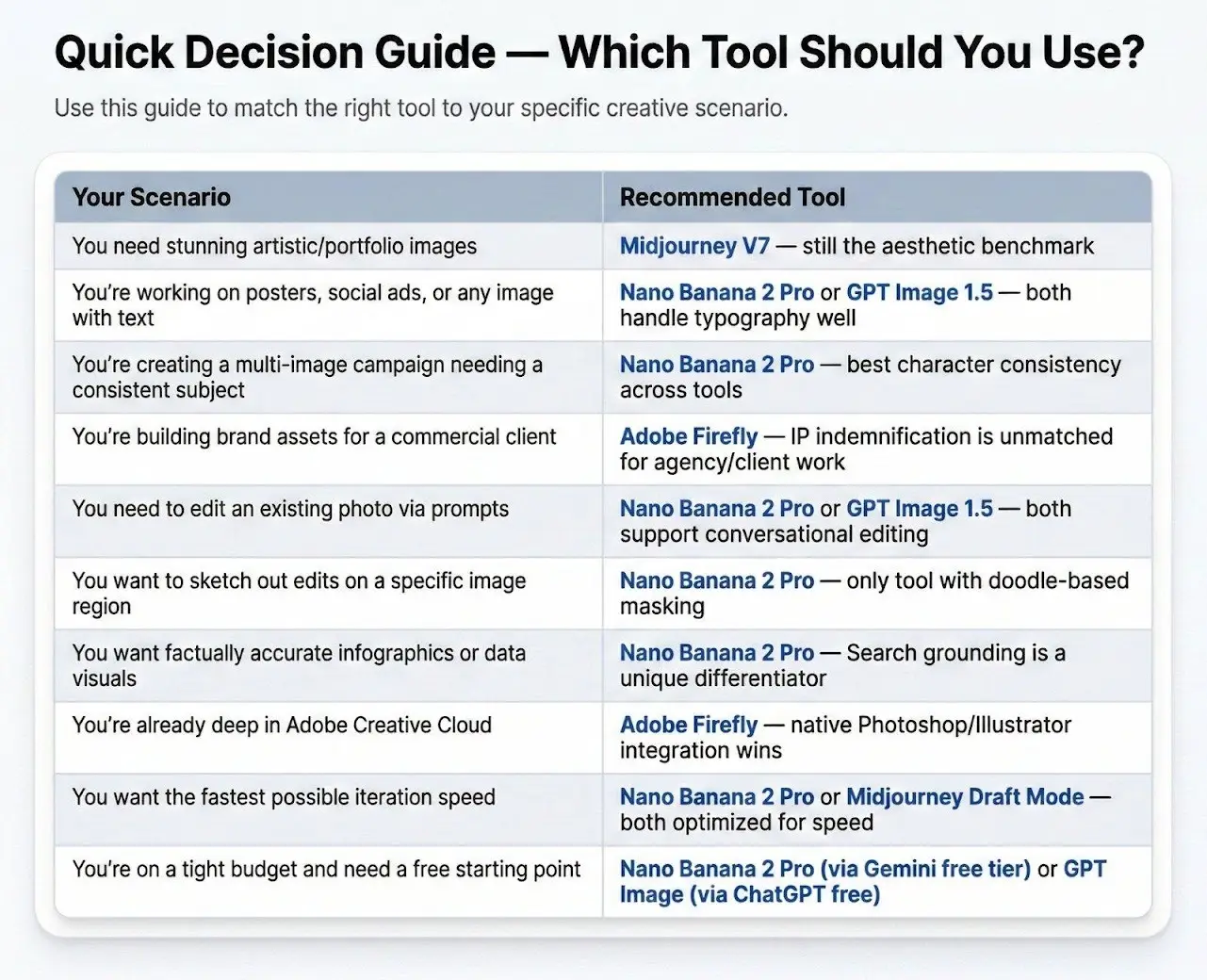
Where to Start Today — Quick Decision Guide
Not sure which tool fits your specific workflow? Use this guide to match the right tool to your creative scenario — whether you’re shooting campaigns, designing social graphics, or building brand assets for clients.
Bottom Line
Nano Banana 2 Pro isn’t the end of photography or graphic design. It’s the beginning of a period where the definition of those disciplines gets meaningfully renegotiated.
The question isn’t whether AI will change your work. It already has, and it’s going to keep accelerating. The question is whether you’re in front of that change or behind it.
Nano Banana 2 Pro is here. Now you know what to do with it.