
Atlas, OpenAI’s new AI-first browser, blends ChatGPT into your browsing. It summarizes pages, automates tasks, and turns the web into a smart, conversational workspace.

For nearly two decades, web browsers have revolved around a single concept — the address bar. You type a URL or search term, open tabs, and navigate through information manually. Atlas, an upcoming browser from OpenAI, challenges that model entirely.
Atlas is built around ChatGPT, making it an AI-first browser where the assistant sits at the heart of the experience. Rather than passively waiting for you to search and click, Atlas listens, reasons, and acts across pages on your behalf. It’s designed to transform the browser from a static tool into a dynamic workspace guided by conversational interaction.
Download practical resources to make AI easier, faster, and more useful — starting now.
Atlas integrates ChatGPT directly into the browsing interface, giving you an always-available assistant that understands the page you’re on. It can summarize long articles, answer questions about what you see, or even run autonomous agents that perform multi-step workflows across multiple sites.
The real innovation lies in memory. Atlas can optionally remember what you’ve worked on — from research notes to projects and preferences — and use that stored context to provide continuity across sessions. Imagine resuming a week-old research thread and having the browser remember which sources you used and what you concluded.
This persistent memory blurs the line between browsing and working, positioning Atlas as more than a browser — it’s a personal knowledge environment where the web becomes your dataset and ChatGPT your collaborator.

If you’re a student, professional, or entrepreneur, this new world simplifies everything.
Persistent ChatGPT Sidebar
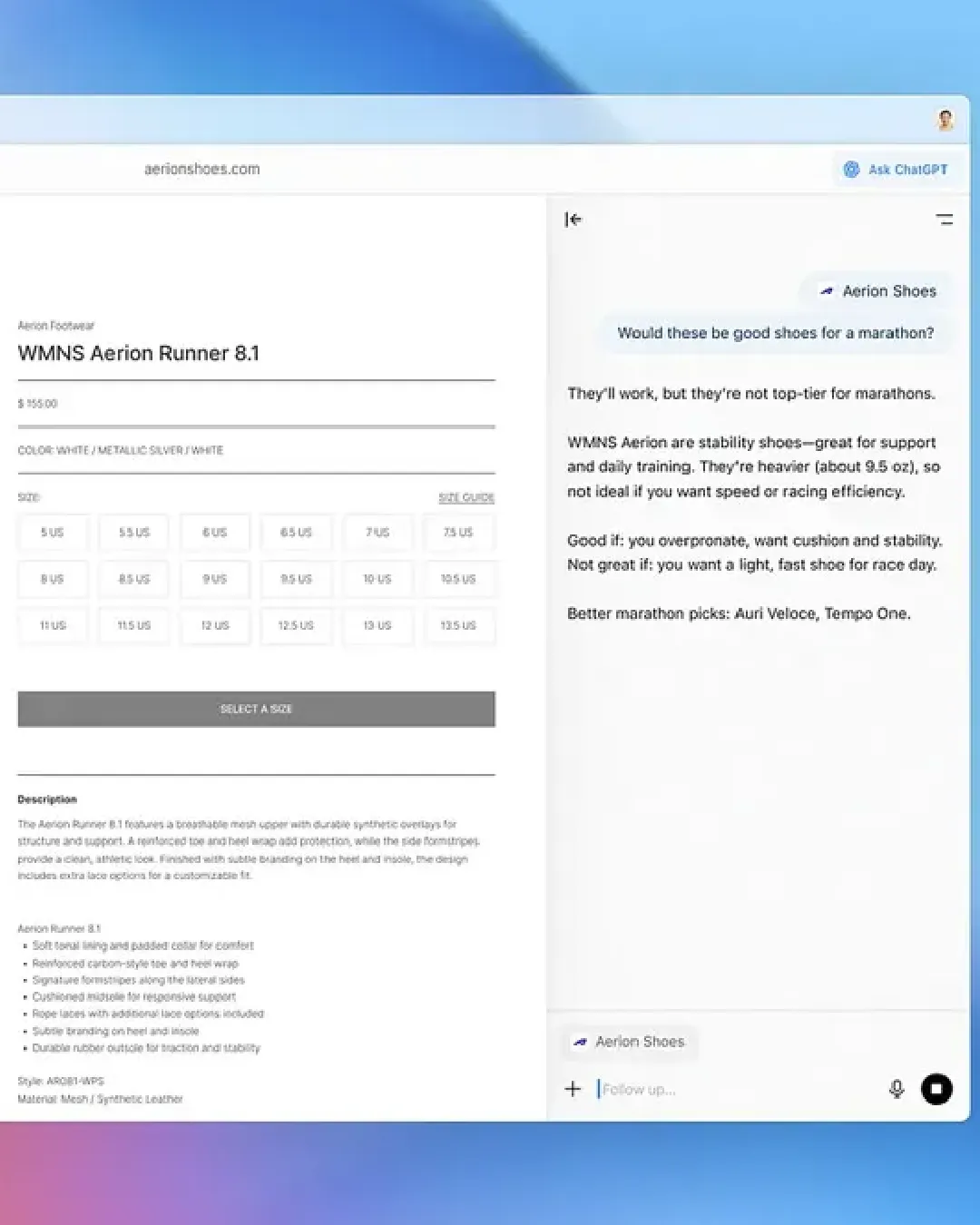
At the core of Atlas is the Ask ChatGPT sidebar — a contextual assistant that understands the current webpage. Without copying or pasting, users can ask it to:
It turns passive browsing into an interactive dialogue, allowing you to work with information rather than just consume it.
Agent Mode for Multi-Step Tasks
Atlas introduces Agent Mode, where ChatGPT executes multi-step actions under user control. Agents can research, fill forms, shop online, or perform repeatable workflows. For example, you could instruct Atlas to:
Paid tiers of Atlas unlock more advanced, longer-running agents capable of chaining together complex web actions — the foundation of a truly autonomous browsing experience.
Chromium Compatibility
Despite its radical approach, Atlas is Chromium-based, ensuring compatibility with existing Chrome extensions, developer tools, and websites. Users can retain the reliability and rendering performance of Chrome, but with a completely different interface paradigm — one where conversational interaction replaces traditional tab sprawl.
Atlas’s power comes from its balance of automation and user control. To harness it effectively:
Tailor memory and visibility settings
Enable memory only for projects where continuity helps. Keep sensitive work isolated by disabling memory or using separate profiles. Begin sessions by stating a clear goal — “Research best CRM tools under $50/month” — so ChatGPT can narrow its focus.
Leverage the sidebar for synthesis
When reading a long document, use Ask ChatGPT to produce structured summaries, key takeaways, and next steps. You can then request the assistant to generate an outreach email, technical specification, or content draft derived directly from that summary.
Automate repetitive workflows
Create agents for routine actions — research, data collection, price comparison, and form filling. For example, an “Event Planner Agent” could gather venue options, compare pricing, and produce a formatted shortlist.
Replace tab overload with conversation
Instead of opening multiple tabs, ask ChatGPT to handle exploration. Example: “Find three competing laptops under $1,000 with similar specs and show the pros and cons.” The assistant curates the results, minimizing distraction.
Practice good extension hygiene
Since Atlas supports the Chrome Web Store, restrict installations to essentials. Separate personal and professional profiles to prevent data leakage across contexts.
These steps ensure you benefit from Atlas’s intelligence without compromising privacy or security.

While all major browsers now experiment with AI, Atlas represents a fundamental shift in interaction design. Chrome, Edge, and Brave remain URL-first, whereas Atlas is conversation-first.
Atlas accelerates workflows that involve synthesis across multiple sources. Traditional browsers require you to search, open, skim, and copy findings. Atlas holds page context, enabling the assistant to do that work for you — a significant efficiency gain for researchers, analysts, and creators.
Chrome and Edge depend on extensions for partial automation. Atlas’s Agent Mode can perform complex sequences like shopping, comparing, or submitting data — all under human supervision. This reduces repetitive manual steps and context switching.
Because Atlas is Chromium-based, users don’t sacrifice compatibility. Websites, extensions, and developer tools behave just as they do in Chrome or Edge. The difference lies in interface philosophy — Atlas reimagines the browser as an intelligent workspace rather than a set of passive windows.
Ultimately, Atlas transforms the browsing mindset from “search, read, act” to “tell the assistant what outcome you need and let it orchestrate the web.”
Atlas doesn’t just alter browsing — it disrupts how we find information. Instead of keyword-based search results, it delivers contextual answers and actions. When users start asking an AI directly for solutions (“Book a hotel near the Louvre for under €200”), they bypass traditional search entirely.
However, Atlas doesn’t replace Google Search across the board. Search engines excel at indexing and ranking billions of pages in real time, providing breadth and recency that an AI model alone can’t replicate.
What Atlas does is challenge the front door of discovery. By combining browsing state, personal memory, and agents, it handles intent-driven workflows — scenarios where users want a result, not a list of links.
In this sense, Atlas threatens Google Search not through competition in indexing, but by changing user intent. If your browser already performs research, comparison, and drafting tasks conversationally, the habit of “Googling it” weakens.
The disruption will likely appear first in verticals where users value synthesis and automation:
For these tasks, Atlas’s agentic model is more aligned with how humans actually think: “What do I need?” rather than “What should I search?”
With great automation comes new responsibility. Atlas’s ability to read and act across pages introduces both productivity benefits and data governance challenges.
Privacy and Data Security
Users must consciously manage what the assistant can see or remember. Atlas offers per-site visibility and memory controls, but discipline is essential. Sensitive work should use memory-off modes or isolated profiles. Enterprises will need to assess compliance requirements, particularly around data retention and external API calls.
Extension and Supply-Chain Risks
Because Atlas builds on Chromium, it inherits both the strength and vulnerabilities of the ecosystem. Unvetted extensions remain a risk vector. Enterprises should enforce whitelists and adopt standard browser-management policies.
Platform Availability
At launch, Atlas targets macOS, limiting its immediate reach. Windows, Android, and iOS versions are in development, which will be crucial for mainstream and enterprise adoption. Early adopters can experiment on non-critical workflows to gauge utility and security posture.
Responsible Agent Use
Agents are powerful but should not be treated as unsupervised bots. Always review the actions they take, validate data handling, and ensure they operate within clearly defined scopes. Over time, organizations may establish agent governance policies similar to those used for RPA (robotic process automation).
These steps ensure you benefit from Atlas’s intelligence without compromising privacy or security.
Attribute | Atlas (Open AI) | Google Chrome | Microsoft Edge | Brave |
|---|---|---|---|---|
AI integration | Native ChatGPT assistant and Agent mode | Optional AI via Gemini in search or extensions | Copilot integration in sidebar | No built-in large AI assistant; extensions possible |
Rendering engine | Chromium-based | Chromium-based | Chromium-based | Chromium-based |
Privacy controls | Per-site AI visibility and memory controls | Standard browser privacy; Google ecosystem data ties | Enterprise features and Microsoft integrations | Stronger default privacy and ad-blocking |
Automation / agents | Agent mode for multi-step tasks | No native agent automation | Limited automation via Copilot and extensions | No native agents |
Platform availability | macOS at launch; Windows, iOS, Android coming | Cross-platform | Cross-platform | Cross-platform |
Best for | Users who want AI as the primary browsing interface | Users needing broad extension ecosystem and tight Google integration | Enterprise and Windows-first users | Privacy-first users and power users |

Atlas is more than a new browser — it’s a new way of working on the web. By merging browsing, AI reasoning, and automation, it creates a unified workspace where the web becomes actionable rather than merely navigable.
Here’s the distilled verdict:
Atlas doesn’t instantly replace Chrome or Google Search; instead, it complements them while redefining expectations. Where traditional browsers focus on access, Atlas focuses on outcome. Where search engines return information, Atlas delivers results.
Over the next 12–24 months, the competition among Atlas, Chrome, Edge, and Brave will hinge on four factors: usefulness, trust, privacy, and reach. The winner won’t just dominate browsing — it will shape how humanity interacts with the web itself.